ZeeMee Community Data Integration Guide
Overview#
ZeeMee allows you to enrich data about student’s in your institutions Community with CRM data.
Before you begin this guide, reach out to your ZeeMee Partner Success Director to receive a copy of the ZeeMee Community Data Notes and Community Data Specs. This guide and the assets it references have been built to those specifications.
Data Connectors#
ZeeMee supports transfer of batch data via API or SFTP.
This guide and the Mapping Template have been designed for SFTP.
ZeeMee will create an SFTP for you via Files.com. You will need to create a data connector (opens in a new tab) for this ZeeMee SFTP in Element451 and point the Export Task there.
Community Data Export
The Element451 team has built a Mapping Template that you can quickly load onto an Export Task and send to ZeeMee. You will be responsible for configuring the Task and scheduling the export. Recommendations for Task configuration are below.
Export Data Mapping Template
| Name | Element451 Slug | Notes | Row |
|---|---|---|---|
| FirstName | user-first-name | 1 | |
| LastName | user-last-name | 2 | |
| user-email-address | 3 | ||
| CellPhone | user-phone-cell-number | 4 | |
| IDNumber | user-elementid | 5 | |
| PreferredName | user-preferred-name | 6 | |
| EntryYear | ZeeMee prefers term and year split to two columns, as opposed to the single column in Element451. This formula converts the term GUID (as it is stored in the database) to the Term name. The Term name is assumed to be saved as “Term Year”, like “Fall 2024”. Split_Index then separates the string via the space in the middle, and selects the second half of the string, “2024”. You should modify this formula if your term name is different (ie 2024 Fall). SPLIT_INDEX(DB_MAP("term", [user-applications-term], "guid", "name", ""), " ", 2) | 7 | |
| EntryTerm | ZeeMee prefers term and year split to two columns, as opposed to the single column in Element451. This formula converts the term GUID (as it is stored in the database) to the Term name. The Term name is assumed to be saved as “Term Year”, like “Fall 2024”. Split_Index then separates the string via the space in the middle, and selects the first half of the string, “Fall”. You should modify this formula if your term name is different (ie 2024 Fall). SPLIT_INDEX(DB_MAP("term", [user-applications-term], "guid", "name", ""), " ", 1) | 8 | |
| StudentType | user-applications-student-type | ZeeMee supports student type options of “First time” and “Transfer”. Modity the Transformations on this column to replace your student type codes with these values. | 9 |
| MiddleInitial | user-middle-name | 10 | |
| EmailOptOut | This calculated column utilizes the Email Unsubscribe Milestone to determine if a contact is opted out. Learn more about Opt Outs in Element451 here and here. if([user-milestones-unsubscribe-email-date], "TRUE", "FALSE") | 11 | |
| Address1 | user-addresses-home-street1 | 12 | |
| City | user-addresses-home-city | 13 | |
| StateProvince | user-addresses-home-state | 14 | |
| ZipCode | user-addresses-home-zip | 15 | |
| Country | user-addresses-home-country | 16 | |
| HomePhone | user-phone-home-number | 17 | |
| SMSTextOptOut | This calculated column utilizes the SMS Unsubscribe Milestone to determine if a contact is opted out. Learn more about Opt Outs in Element451 here and here. if([user-milestones-unsubscribe-email-date], "TRUE", "FALSE") If you are fully leveraging the user-sms-updates system field, you may choose to swap this calculated field with a standard mapping to user-sms-updates | 18 | |
| CurrentStatus | user-calculated-funnel_stage | Element451 automatically calculates a student’s status based on their Milestones. Learn more about Milestones, funnel stages, and the active funnel status trait. The following table translates Element451 Funnel Statuses to ZeeMee statuses. CURRENT STATUS CODE CURRENT STATUS DESCRIPTION ZM CURRENT STATUS FUNNEL STAGE SUSPECT Having a "Record Created At" milestone as the most recent. Inquired INQUIRED PROSPECT Having a "Date of Inquiry" milestone as the most recent. Inquired INQUIRED APPLICATION_START Having a "Application Start Date" milestone as the most recent. Application Started INQUIRED APPLICATION_SUBMIT Having a "Application Submit Date" milestone as the most recent. Application Complete COMPLETED APP ADMIT Having a "Admit Date" milestone as the most recent. Accepted ADMITTED CONDITIONAL_ADMIT Having a "Conditional Admit Date" milestone as the most recent. Accepted ADMITTED DEFERRED Having a "Deferred Date" milestone as the most recent. Deferred COMPLETED APP DENIED Having a "Denied Date" milestone as the most recent. Denied COMPLETED APP WAITLIST Having a "Waitlist Date" milestone as the most recent. Waitlisted COMPLETED APP HOLD Having a "Hold Date" milestone as the most recent. Waitlisted COMPLETED APP WITHDRAW Having a "Withdraw Date" milestone as the most recent. ApplicationComplete Withdrawn COMPLETED APP DEPOSIT Having a "Deposit Date" milestone as the most recent. Committed COMMITTED ENROLL Having a "Enroll Date" milestone as the most recent. Enrolled ENROLLED | 19 |
| DateofBirth | user-dob | 20 | |
| Race | user-race-categories | ZeeMee’s Community Data Notes ask for RaceEthnicity as a single column but will accept two columns at the time of this writing. In Element451, Race is shown as IPEDS categories by default. You may need to update your copy of the Template to support a custom data source for Race. | 21 |
| EthnicityHispanic | user-race-hispanic | ZeeMee’s Community Data Notes ask for RaceEthnicity as a single column but will accept two columns at the time of this writing. In Element451, ethnicity is a Boolean indicating that a student identifies as hispanic. You may need to reconfigure this column if you use a custom data source or custom field for ethnicity. | 22 |
| FirstGenFlag | This column is left unmapped in the Mapping Template. Element451 does not have a system field to specifically flag contact’s as first gen students. You may have a custom field for this or calculate it via a student’s listed family members. | 23 | |
| Gender | user-gender | 24 | |
| DateofInitialContact | user-milestones-prospect-date | Contact’s are assigned a Date of Inquiry Milestone when they submit a Form or Register for an Event. Element451 defines this as the initial contact where the student becomes a prospect. | 25 |
| InitialSourceCode | user-calculated-first_source | Element451 automatically creates Sources for contact records, and Sources can be manually assigned. This calculated trait finds the first Source a contact was assigned. | 26 |
| CollegeCounselorNameCode | user-owner | In Element451, counselors or representatives are often assigned to the contact as the “owner” or “assignee”. A contact’s owner is stored on the contact record as their Element ID, which corresponds to the counselor’s account in Element451. Find a counselor’s Element ID by navigating to their profile at Settings > Manage Users and observing the URL of their profile. It is the series of numbers and letters at the end of the URL. Having located the Element ID, add a Replace transformation to the user-owner column, replacing the Element ID with the staff user’s name. Repeat for each staff user. | 27 |
| CollegeCounselorEmail | Consider mapping this column to user-owner if you utilize assignees in Element451. In Element451, counselors or representatives are often assigned to the contact as the “owner”. A contact’s owner is stored on the contact record as their Element ID, which corresponds to the counselor’s account in Element451. Find a counselor’s Element ID by navigating to their profile at Settings > Manage Users and observing the URL of their profile. It is the series of numbers and letters at the end of the URL. Having located the Element ID, add a Replace transformation to the user-owner column, replacing the Element ID with the staff user’s email. Repeat for each staff user. | 28 | |
| InitialVisitType | Element451 supports visits as a type of Event, but does not enforce a “visit” type event. If you consider all Event in Element451 to qualify as visits, consider mapping user-events-event_type | 29 | |
| InitialVisitDate | Element451 supports visits as a type of Event, but does not enforce a “visit” type event. If you consider all Event in Element451 to qualify as visits, consider mapping user-events-date Alternatively, consider automating the creation of a Visit Date Milestone per contact (it will not generate automatically). Then map user-milestones-visit-date in this column. | 30 | |
| ApplicationDate | user-applications-submitted-time | 31 | |
| ApplicationCompletedDate | user-applications-completed-at | 32 | |
| WaitlistedDate | Waitlist Date is stored as a Milestone in Element451, separate from the Application. As such, we cannot guarantee a waitlist date is associated with a particular Application when exporting. For student’s with multiple applications, a waitlist date might have been created for the first application, but not be relevant to the second. This formula checks that the waitlist date is greater than the application submitted date. IF(DATE_COMPARE([user-milestones-waitlist-date], ">", [user-applications-submitted-time]) = "TRUE", DATE_FORMAT([user-milestones-waitlist-date], "Y-m-d"), "") | 33 | |
| DeniedDate | Denied Date is stored as a Milestone in Element451, separate from the Application. As such, we cannot guarantee a denied date is associated with a particular Application when exporting. For student’s with multiple applications, a denied date might have been created for the first application, but not be relevant to the second. This formula checks that the denied date is greater than the application submitted date. IF(DATE_COMPARE([user-milestones-denied-date], ">", [user-applications-submitted-time]) = "TRUE", DATE_FORMAT([user-milestones-denied-date], "Y-m-d"), "") | 34 | |
| AcceptedDate | user-applications-decision-released-at | 35 | |
| DecisionsReleasedFlag | ZeeMee asks for a flag to indicate that a student’s decision has been released and communications about it can be sent. This formula checks for the presence of a decision released date and uses it to generate a boolean. if([user-applications-decision-released-at], "TRUE", "FALSE") | 36 | |
| CommittedDate | Deposit Date (which corresponds to ZeeMee “committed” status) is stored as a Milestone in Element451, separate from the Application. As such, we cannot guarantee a deposit date is associated with a particular Application when exporting. For student’s with multiple applications, a deposit date might have been created for the first application, but not be relevant to the second. This formula checks that the deposit date is greater than the application submitted date. IF(DATE_COMPARE([user-milestones-deposit-date], ">", [user-applications-submitted-time]) = "TRUE", DATE_FORMAT([user-milestones-deposit-date], "Y-m-d"), "") | 37 | |
| WithdrawalDate | Withdrawal Date is stored as a Milestone in Element451, separate from the Application. As such, we cannot guarantee a withdrawal date is associated with a particular Application when exporting. For student’s with multiple applications, a withdrawal date might have been created for the first application, but not be relevant to the second. This formula checks that the waitlist date is greater than the application submitted date. IF(DATE_COMPARE([user-milestones-withdrawal-date], ">", [user-applications-submitted-time]) = "TRUE", DATE_FORMAT([user-milestones-withdrawal-date], "Y-m-d"), "") | 38 | |
| HSCEEBCode | user-education-highschools-ceeb | 39 | |
| HSName | user-education-highschools-name | 40 | |
| ZeeMeeID | user-identities-zeemeeid | 41 |
Export Data Task
To send data to ZeeMee via SFTP, you must create an Export Task (opens in a new tab).
Here is some recommended configurations for that task.
Creating a Segment to Export
ZeeMee requests a growing file that includes all records in a cohort, even if they’ve appeared in prior exports to ZeeMee.
Your institution will have unique concerns, but these are some Segment filter combinations you may consider.
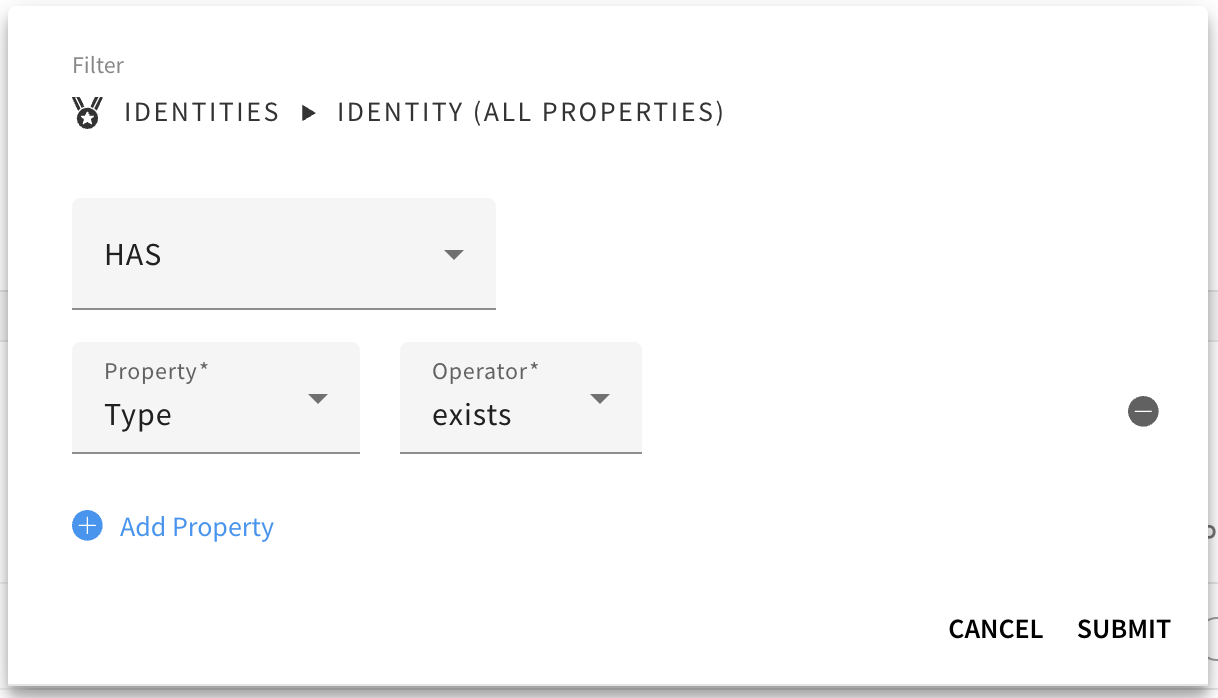
All Records (Identities Type Exists)
This would effectively create a Segment of all user’s in Element451.
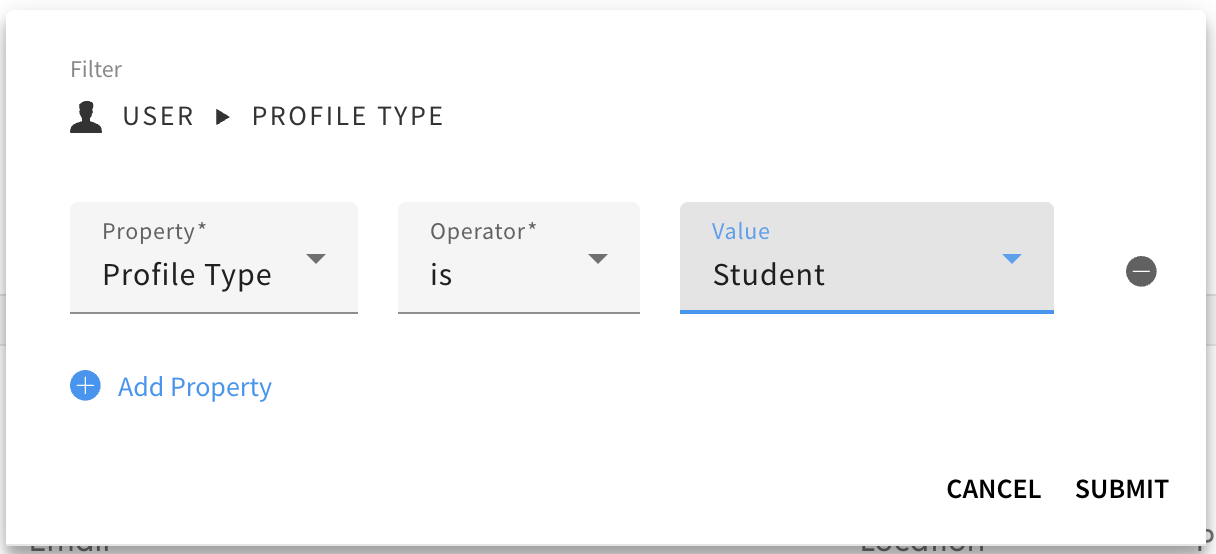
All Student Records (Profile Type is Student)
If your instance includes family members and influencers, this Segment Filter would limit the export to just students.
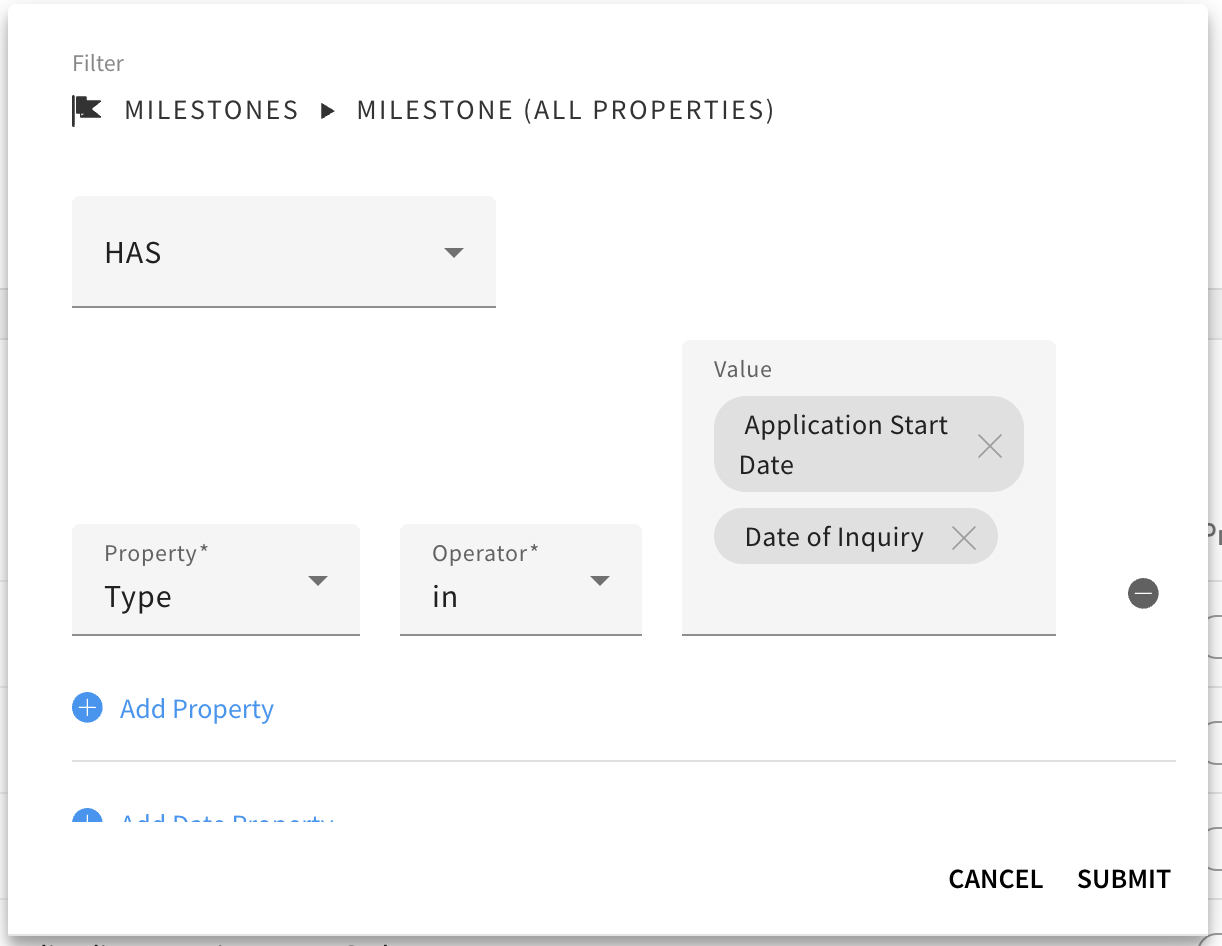
Prospects + Applicants (Milestone Type in Date of Inquiry or Application Start Date)
This would segment only contacts that have a Date of Inquiry or Application Start Milestone.
Repeating Rows on Application
To send the latest application data, set the Export to repeat rows based on Application.
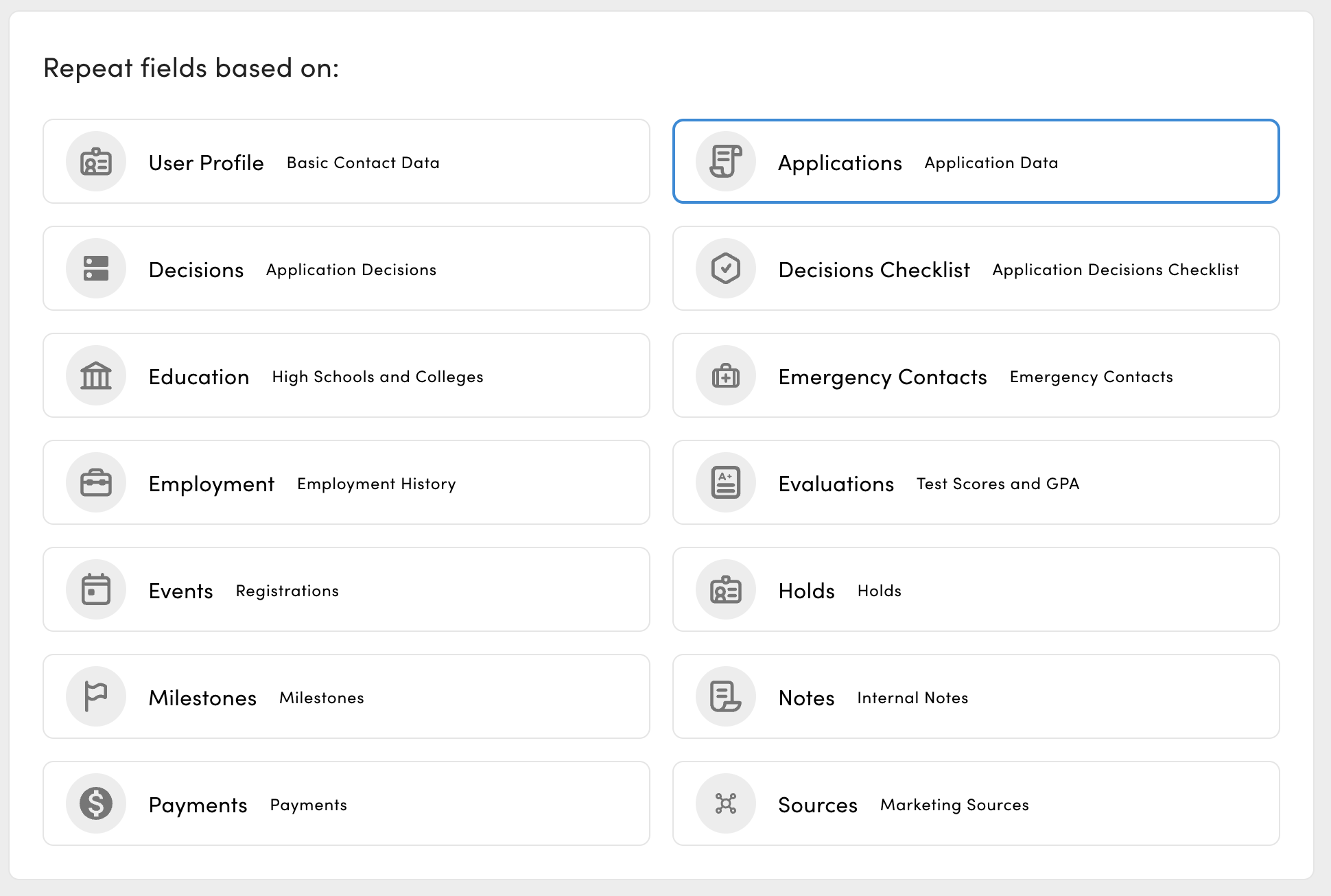
Then set “Item To Export” to Last and order by Application Created Date ascending.
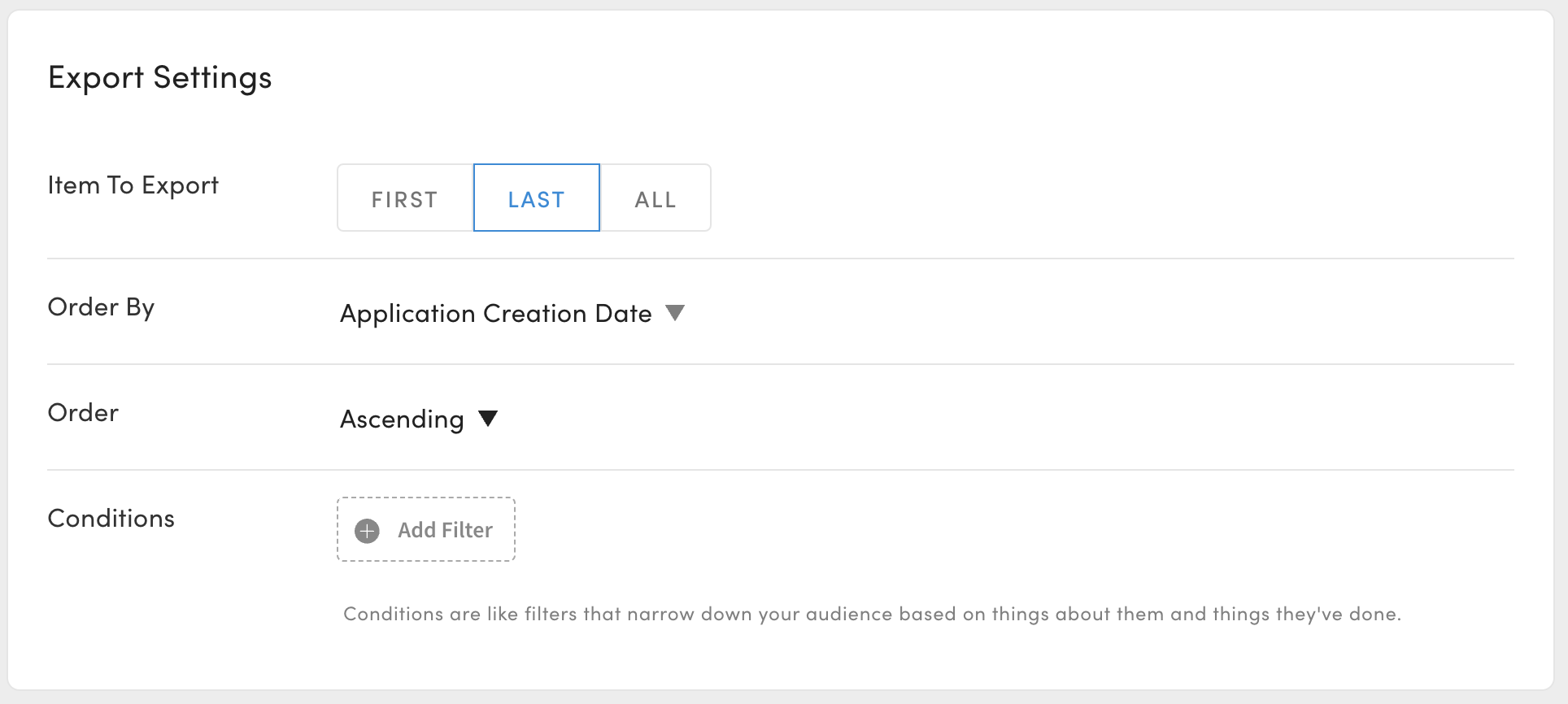
This will enable the user-applications-... fields to find the student’s latest application.
File Naming Convention
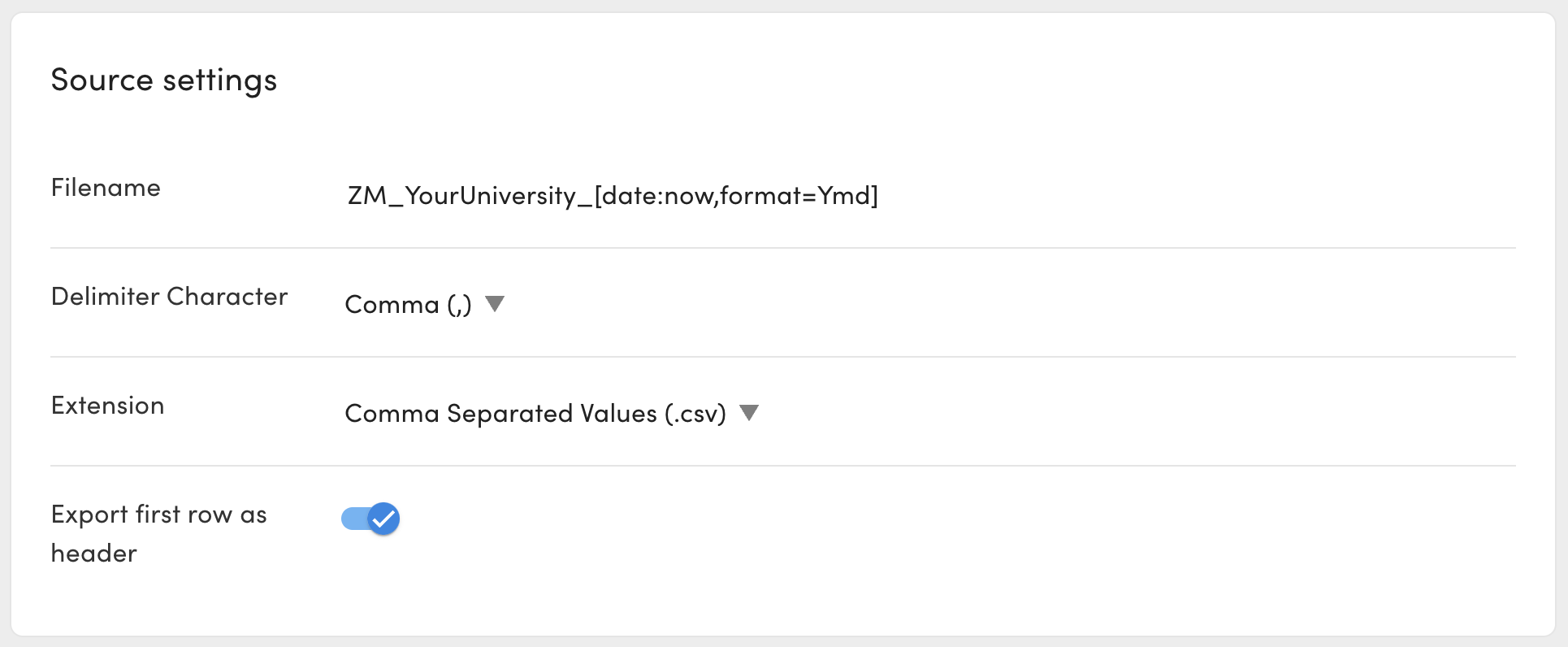
Ensure your file will be named according to ZeeMee’s convention, ZM_YourUniversity_YYYYMMDD.csv.
Replace "YourUniversity" with your institution’s name.
Use the [date:now,format=Ymd] token to dynamically add the export day’s date in the correct format.
Delivering the Export File to the ZeeMee SFTP
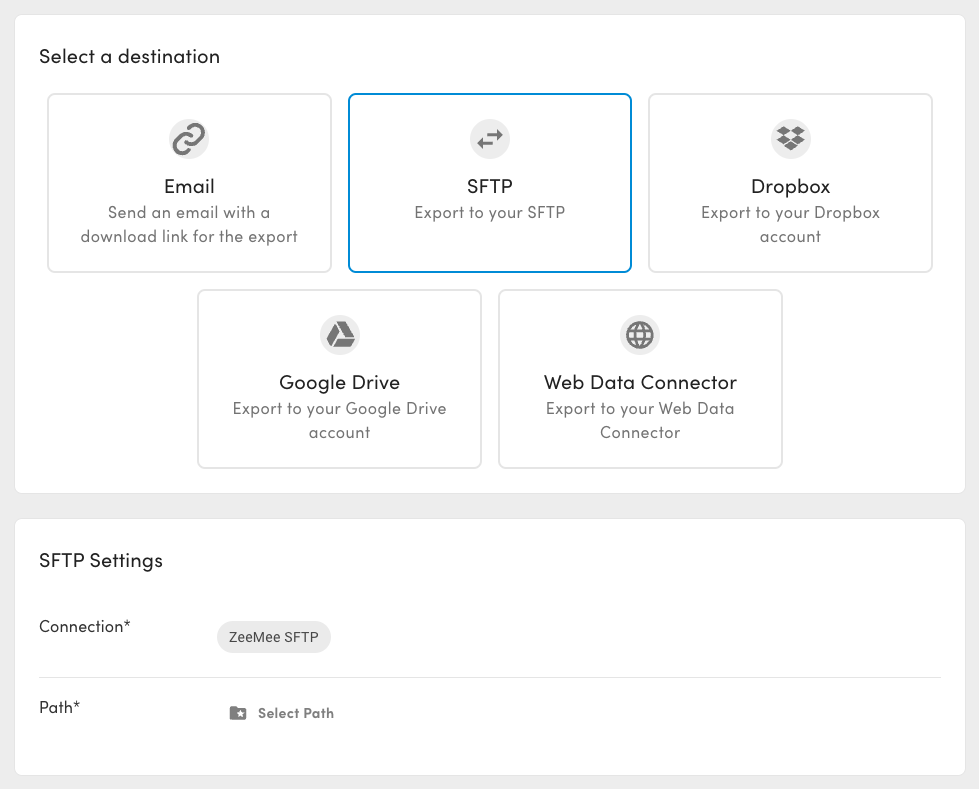
Configure the destination of the Export Task to deliver the file to your ZeeMee SFTP Data Connector.
Community Engagement Import
ZeeMee sends contact data and aggregate activity counts via the Community Engagement file, which you can import to Element451 using the Mapping Template. You will be responsible for creating and configuring the Import Task. Recommendations for the Task are below.
The Mapping Template only maps a few fields as most columns don’t have matching system fields. Optional mappings are listed in the Notes of each column, below.
Recommended Assets
Consider creating the following assets in Element451 to accompany this Import Task.
Custom Fields#
ZeeMee activity and community data does not have a system-delivered field. Consider creating a Custom Field (opens in a new tab) for columns 18-41.
Custom Profile Card#
Custom Fields can be displayed in Custom Profile Cards (opens in a new tab) when viewing a student’s record in Element451. Consider creating a Custom Card for ZeeMee data to quickly surface it for your team.
ZeeMee Source Code#
Consider creating a Source Code (opens in a new tab) for ZeeMee and mapping it in column 43.
Though not required, you might also create term-based Source Code Segments and mapping them in column 44. Note that the Source Code Segment taxonomy will have to be updated every term if this approach is used.
Import Data Mapping Template
| Name | Element451 Slug | Notes | Row |
|---|---|---|---|
| Entry.Term.ZM | This is the entry term (ie “Fall”, “Spring”) that the student has selected on ZeeMee. Consider importing if student’s intended term is unknown. NOTE: Entry.Term.ZM and Entry.Year.ZM are combine and mapped to user-education-term in column 46. Delete this calculated column if this data is unwanted. | 11 | |
| ZeeMee.Engagement.Score | Consider mapping to a Custom Field. | 41 | |
| Interested | Consider mapping to a Custom Field. | 25 | |
| EDIT: ZeeMee Source Code Segment | user-sources-source-code-segment | Create a Source Code Segment for ZeeMee and insert the taxonomy in the formula for this column. “instance.taxonomy.49472” . Else delete this calculated column. | 45 |
| Last.Login.Date | Consider mapping to a Custom Field. | 36 | |
| Public.Private.Profile | 24 | ||
| Community.Match | 21 | ||
| Last.Engaged.Date | Consider mapping to a Custom Field. | 37 | |
| ZM.Major.2 | 40 | ||
| Partner.Institution | 10 | ||
| Community.Join.Stage | Consider mapping to a Custom Field. | 20 | |
| Videos.Viewed.Unique | Consider mapping to a Custom Field. | 34 | |
| Phone.Number | user-phone-cell-number | Be advised, mapping to this field may overwrite an existing phone number on the contact’s record. Remove the mapping if this behavior is unwanted. Consider, if different, the number used for a social app could be a more used than the number submitted to an inquiry form or application. | 9 |
| Chats.Viewed | Consider mapping to a Custom Field. | 32 | |
| EngagedAny | Consider mapping to a Custom Field. | 38 | |
| Going | Consider mapping to a Custom Field. | 29 | |
| Competitor.Match | 22 | ||
| Entry.Term.PartnerCSV | “PartnerCSV” columns reference data you might have sent to ZeeMee via the Community Data Export. | 12 | |
| EDIT: ZeeMee Source Code | user-sources-souce-code | Create a Source Code for ZeeMee and insert the taxonomy in the formula for this column. “instance.taxonomy.49472”. Else delete this calculated column. | 44 |
| ZeeMee.Engagement.Index | Consider mapping to a Custom Field. | 42 | |
| ZeeMee Source Date | user-sources-source-code-date | DATE_READ(DATE_DEFAULT("m/d/Y"),"m/d/Y") Applies the date that the import was run as the date of the Source. Alternatively, consider mapping the Community.Join.Date column 20 as the Source date. | 43 |
| ZM.Major.1 | Consider mapping to Custom Field or Intended Major, if unknown. | 39 | |
| Chats.Sent | Consider mapping to a Custom Field. | 31 | |
| Accepted.Community | Consider mapping to a Custom Field. | 26 | |
| Student.ID.PartnerCSV | user-elementid | 2 | |
| Commit.Button | 23 | ||
| user-email-address | 8 | ||
| Entry.Year.ZM | This is the entry year (ie “2021”, “2022”) that the student has selected on ZeeMee. Consider importing if student’s intended term is unknown. NOTE: Entry.Term.ZM and Entry.Year.ZM are combine and mapped to user-education-term in column 46. Delete this calculated column if this data is unwanted. | 13 | |
| Videos.Liked | Consider mapping to a Custom Field. | 33 | |
| Last.Name | user-last-name | 7 | |
| Friend.Finder | Consider mapping to a Custom Field. | 28 | |
| Total.Partner.Videos | Consider mapping to a Custom Field. | 35 | |
| Entry/Year.PartnerCSV | “PartnerCSV” columns reference data you might have sent to ZeeMee via the Community Data Export. | 14 | |
| First.Name | user-first-name | 6 | |
| HS.on.ZM | 17 | ||
| Community.Join.Date | Consider mapping to a Custom Field. | 19 | |
| Schools.Followed | 30 | ||
| Student.Type.ZM | 15 | ||
| in.CSV.File | 4 | ||
| EDIT: Intended Term | user-education-term | ZeeMee send term and year split to two columns, as opposed to the single column in Element451. This formula converts combines the term and year from columns 11 and 13 into a single string. Then the DB_MAP formula converts the term name into the GUID. If you don’t wish to intended import term from ZeeMee or if your Term names are not stored as “Fall 2024”, “Spring 2025”, etc, you should modify this formula. DB_MAP("term", CONCAT([C11], " ", [C13]), "name", "guid", "") | 46 |
| Student.Name | 5 | ||
| ZeeMee.ID | user-identities-zeemeeid | 1 | |
| Room.Mate.Quiz | Consider mapping to a Custom Field. | 27 | |
| HS.in.PartnerCSV | “PartnerCSV” columns reference data you might have sent to ZeeMee via the Community Data Export. | 18 | |
| School.ID2 | user-identities-schoolid | 3 | |
| CEEB.Code.PartnerCSV | “PartnerCSV” columns reference data you might have sent to ZeeMee via the Community Data Export. | 16 |
Import Data Task
To Import data from ZeeMee, you must create an Import Task (opens in a new tab).
Here is some recommended configurations for that task.
Import from ZeeMee SFTP
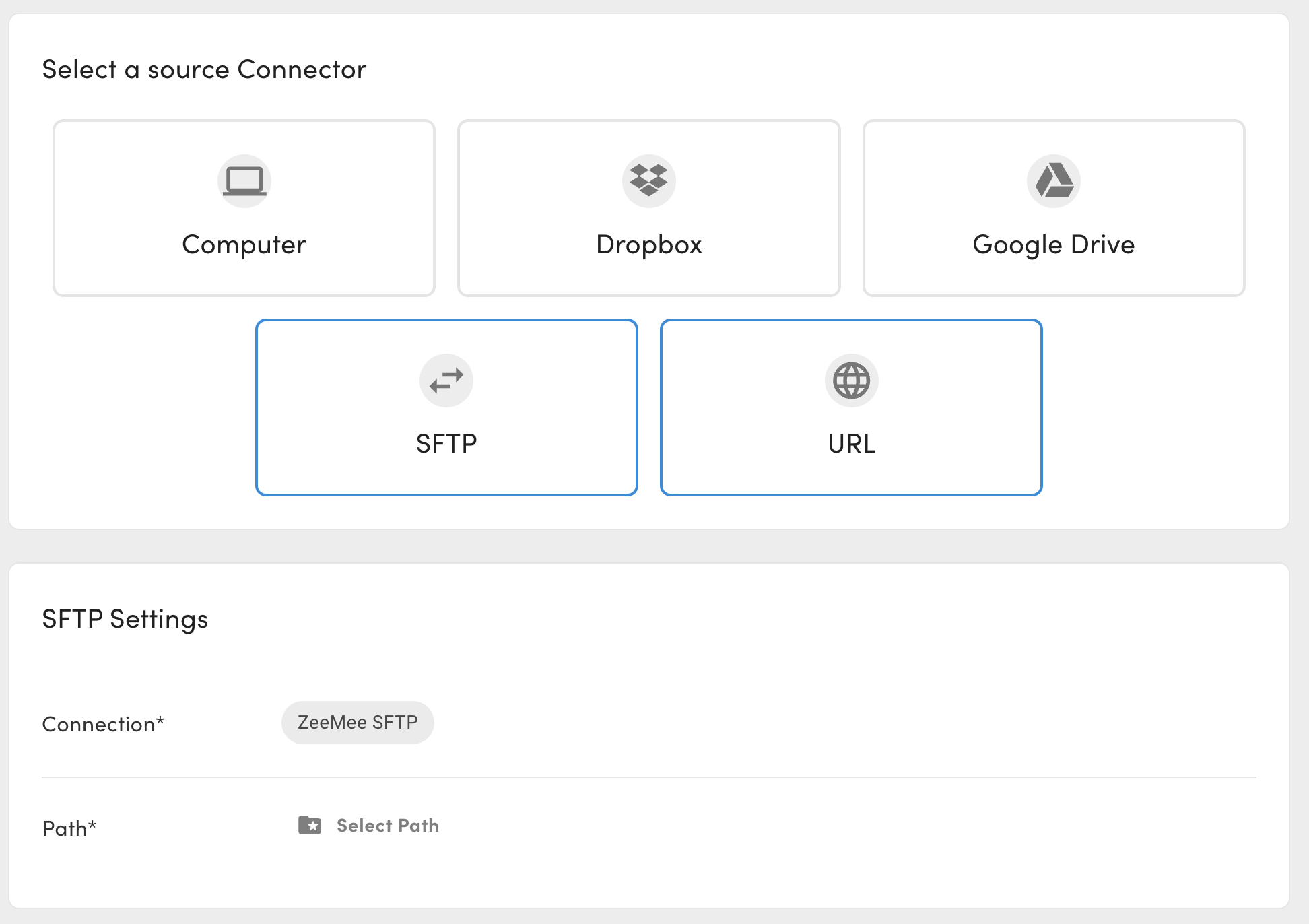
Select the Source of the Import to look in the ZeeMee SFTP Data Connector.
Match Entries By All Available Identities
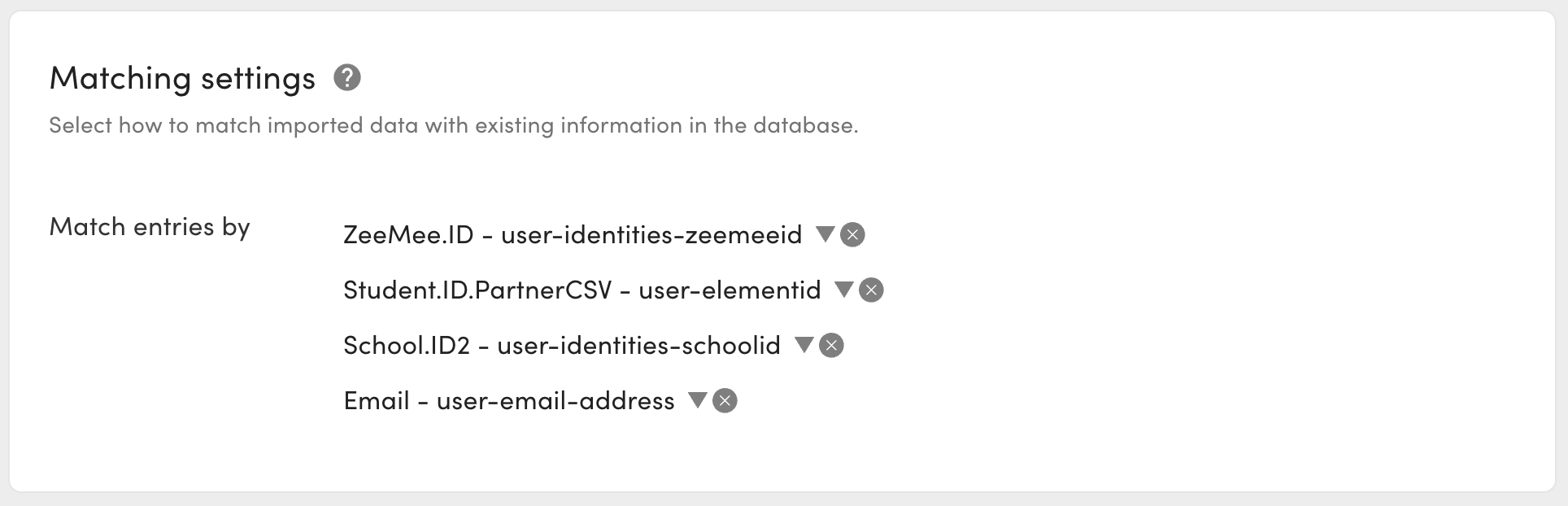
Under Match Settings, configure the “Match entries by” to match on all available identities, including ZeeMee ID, Element ID, School ID and Email address. This will prevent duplicate records.
Create New Segment for Import Task
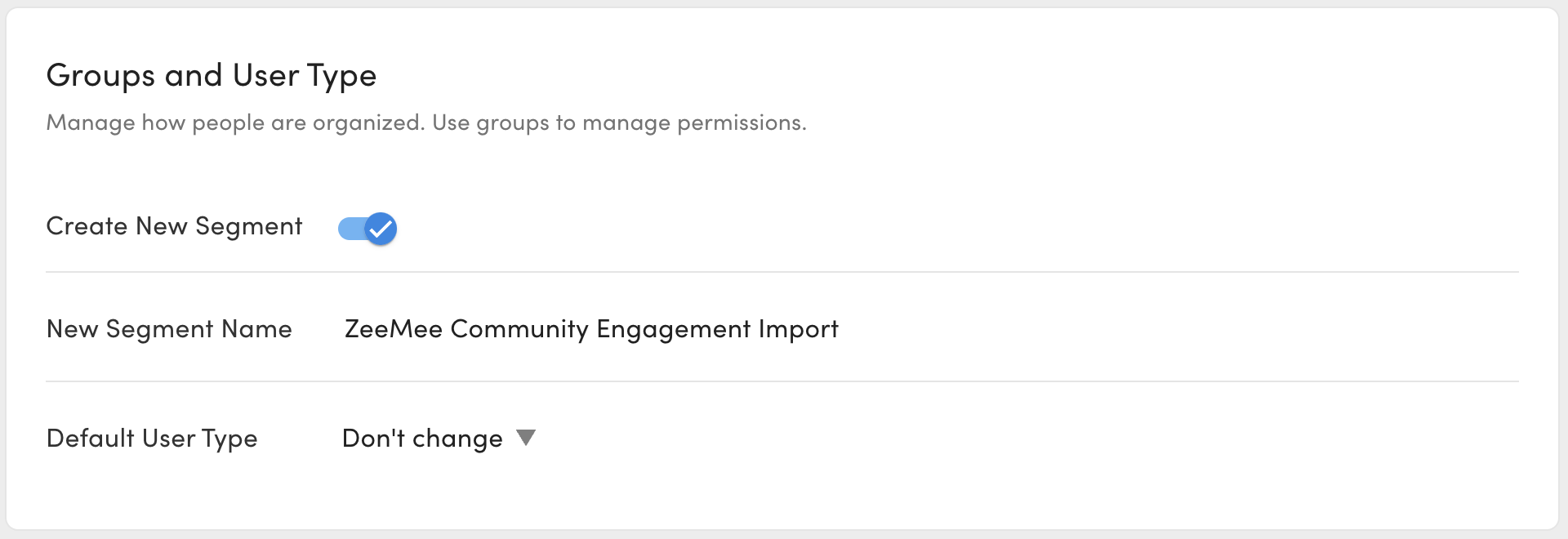
Under “Groups and User Type”, create a new Segment for all contact’s affected by the Import Task. This will help you quickly find ZeeMee contacts and debug potential issues.
Always Preview and Test Import
Always Preview and Test Import the task before running the Task. Ensure that any dates or data source values have been properly interpreted (opens in a new tab).