Pre-Integration Readiness Checklist
1. 🔍 Stakeholder Alignment & Governance#
- Identify executive sponsor and project champion
- Form a cross-functional implementation team (Admissions, Marketing, IT, Financial Aid, etc.).
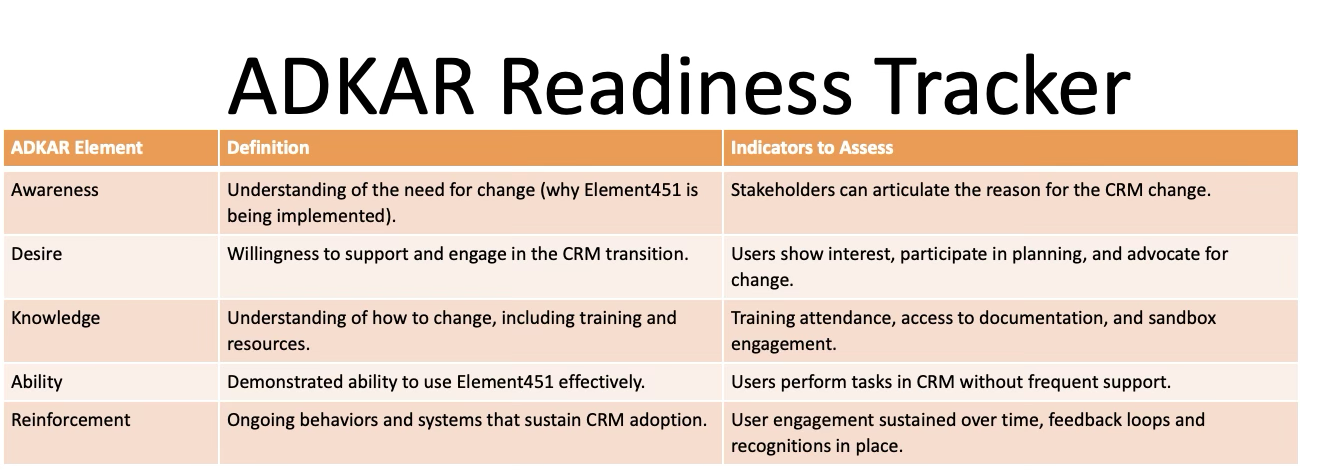
- Build Awareness among stakeholders by clearly articulating the reasons for CRM adoption.
- Establish roles, responsibilities, and communication cadence (RACI is great for this Responsible, Accountable, Consulted, Informed)
- Define success metrics aligned with strategic enrollment and student experience goals
- If you do not have a documented project management process, create a Project Charter that speaks to Stakeholder Alignment and Governance.
2. 🧭 Change Management Readiness#
- Conduct a change readiness assessment
- Create a stakeholder engagement plan.
- Develop a communications roadmap (internal and external messaging). Ensure communication explains the business drivers and strategic goals behind the transition to Element451.
- Prepare adoption metrics and feedback loops
- Identify likely areas of resistance and create a mitigation plan. Cultivate Desire by involving impacted users early and aligning CRM benefits with their daily challenges.
3. 🗂️ Data Integrity & Preparation#
- Perform a system-wide data audit (across SIS, legacy CRM, and spreadsheets)
- Document and confirm the current data process with all fields and where they come from.
- Standardize key data fields (names, phone numbers, program codes, etc.)
- Eliminate duplicates and inactive records
- Map data sources and define which data will migrate
- Review data governance policies (e.g., FERPA compliance, retention rules)
- Determine timing for integration
4. 🔐 Security & Compliance Preparation#
- Engage IT and security teams early
- Define role-based access controls
- Document security practices for audits
5. 🛠️ Technical Preparation & Infrastructure#
- Inventory all existing inquiry forms, events, communication campaigns, and workflows
- Assess current third-party integrations (e.g., Zoom, Mailchimp, Chatbot, Calendly)
- Define integration priorities and timelines
- Confirm API documentation availability for SIS and other platforms
6. 📚 Training & Support Readiness#
- Define roles-based training needs
- Schedule onboarding sessions for power users and end users
- Create a knowledge base (e.g., SOPs, recordings, FAQs)
- Identify CRM champions to support user adoption
- Plan for ongoing training cycles and refresher sessions
- Use change champions to generate enthusiasm and model commitment to the new system.
- Implement ongoing support mechanisms, refresher training, and performance reviews to prevent regression.
✅ Final Go-Live Readiness#
- Stakeholder alignment and communications in place
- Change management plan activated
- Data audit completed and integrations mapped
- Security, access, and role provisioning completed
- Training delivered and knowledge base published
- CRM environment configured for go-live
- Celebrate all of your successes!
Go-live support team and escalation plan in place
🧩 SIS-Specific Preparation Checklists#
🔷 Colleague (Ellucian)#
- Identify your integration strategy, whether through Ethos, batch, or another integration platform. Confirm availability and access.
- Validate program, term, student, and person matching logic
- Standardize codes for major fields like academic program, term, and status
- Review duplicate detection rules.
- Resolve Ethos-dependent errors from legacy data.
🔷 Banner (Ellucian)#
- Identify your integration strategy, whether through Ethos, batch, another integration platform, or custom Banner scripts. Confirm availability and access.
- Verify access to tables such as SPRIDEN, SGBSTDN, SAAADMS
- Ensure mappings for recruitment funnel stages and term codes
- Clean up duplicate PIDMs and define matching rules
- Review any dependency on Banner Workflow or DegreeWorks integrations
🔷 Jenzabar#
- Determine whether the school uses Jenzabar EX, JX, or SONIS
- Confirm API or flat-file export capabilities
- Validate key tables (e.g., student, applicant, course, and communication)
- Establish process for syncing communications preferences
- Clarify update frequency and data push vs. pull methods
🔷 Populi#
- Review Populi’s REST API capabilities and rate limits
- Confirm available fields for syncing (contact info, program, term, custom fields)
- Define scope of integration (one-way or bi-directional sync)
- Set up test accounts and developer access as needed
🔷 Workday Student#
- Coordinate with security admin to set up Workday API credentials and scopes.
- Define Workday reports or integrations for data pull (e.g., RaaS - Report-as-a-Service)
- Review fields like StudentAcademicPeriod, StudentApplication, ProgramEnrollment
- Clarify timing for integration development (due to Workday’s extensibility model)
Was this page helpful?