Exporting User Data
URL#
POST https://{{client}}.api.451.io/v2/users/exportHeaders#
- Authentication = Bearer {{api_key}}
- Feature = {{feature}}
Body Schema#
In general, there are two ways you can build a schema for exporting data out of Element:
- Pre-defined/Element template
{ "item": { "template": "", ... } }- The template can be passed inline in the request body itself as an object/array (what is shown below) or if there's an existing template in the system a guid can be passed as a string (what is shown above). If no template is provided, it defaults to returning only the Element User ID.
- Inline template
{ "item": { "columns": [ { "field":"", "mode":"", "slug":"", "transformations":[], "validations":[], "empty":"" } ], ... } }- When building an inline template, the properties are as follows:
- "columns" : [array] - (required) list of object properties to be exported for each row (you could also review How to Reference a Segment below to see how to get this from the UI).
- "field" : "string" - (required) Friendly name of the field to be exported.
- "mode" : "string" - (required) Generally should be set to “slug”. Other options include “skip” and “calculated”. For skip, this skips exporting the data for that specific slug. The field name and slug name (can be any text string) still need to be populated in the template. For calculated, the formula value needs to be included in the template.
- "slug" : "string" - (required) Slug of the referenced Mapping.
- "transformations" : [array] - (optional) Any transformation to be applied on the value.
- "validations" : [array] - (optional) Any validation to be applied to the value.
- "empty" : "mixed" - (optional) Action to do when the value is empty.
- "columns" : [array] - (required) list of object properties to be exported for each row (you could also review How to Reference a Segment below to see how to get this from the UI).
- When building an inline template, the properties are as follows:
The full body scheme (after the template or inline column), can look like this:
{
  "item": {
    ...

    "users": [],
    "segment":  "" or [{...},{...}],
		"per_page": #,
    "last_id": "",
    "options": {
      "column_key": ,
      "unwind":
      }
   }
}- "users": [array] - (Not required if using segment mode below) - List of users to export. Limited to 50 users per request.
- "segment" : "mixed"- (Not required if using user list mode above) The segment can be passed as a raw inline segment in the request body itself or if there's an existing segment on the system a guid can be passed. (see How to Reference a Segment below)
- "per_page": integer - (Optional, default & max:50) How many users information you want to retrieve for a single request. Cannot be more than the default value.
- "last_id" : "string" - (Optional, default:null) Is used to access the next page in the result set. For the first page it must be NULL or not specified. On each response received under “meta.next_last_id” the value you need to specify to pull the next page will be listed. You will find the last page when there are no rows in page content or “meta.next_last_id” value is empty in response.
- “options”: object - (optional) Configurable options for the export task.
- "column_key" : “string” - (default:field) Generally should be "slug" and it will affect the resulting json object keys for each row. When using "slug" given none slug columns will not have a key.
- "unwind.root": {object} - Any entity you want to use for unwinding user rows, creating a “row” of data for each item in the object. If you are exporting repeaters using root mappings, don't use this option. (Example - { "root" : "user-applications-root" }). There are some grouping, like conversations, that are not available through root mappings and require the unwind option.
- "apply_segment_filters”: Boolean - If using the “unwind”:{”root”: {object}} option with a segment option, this should be set to true. Otherwise, this is false by default.
Example 1 - [user list] basic, using slugs as keys
Request:
POST https://{{client}}.{{api}}/v2/users/export

URL parameters:
{{client}}: Assigned client subdomain.
{{api}}: URL of the Element451 API. "api.451.io" for Production API.

Request headers:
Feature: Feature token for that client
Authorization: Bearer API Key
Content-Type: 'application/json'

Request body parameters:
{
    "item": {
        "options" : {
            "column_key" : "slug"
        },
        "template": {
            "columns": [
                {
                    "field": "Element ID",
                    "mode": "slug",
                    "slug": "user-elementid"
                },
                {
                    "field": "Email",
                    "mode": "slug",
                    "slug": "user-email-address"
                },
                {
                    "field": "First Name",
                    "mode": "slug",
                    "slug": "user-first-name"
                },
                {
                    "field": "Last Name",
                    "mode": "slug",
                    "slug": "user-last-name"
                }
            ]
        },
        "users": [
            "576af6b42e402e8d4c8b4569",
            "5e1cc41c0396032a6e3a06c8"
        ]
    }
}

Expected Response:
Status 200
{
    "data": [
        {
            "user-elementid": "576af6b42e402e8d4c8b4569",
            "user-email-address": "john.smith@example.com",
            "user-first-name": "John",
            "user-last-name": "Smith"
        },
        {
            "user-elementid": "5e1cc41c0396032a6e3a06c8",
            "user-email-address": "jane.jenkins@example.com",
            "user-first-name": "Jane",
            "user-last-name": "Jenkins"
        }
    ]
}
Example 2 - [user list] with unwinding applications
Request:
POST https://{{client}}.{{api}}/v2/users/export

URL parameters:
{{client}}: Assigned client subdomain.
{{api}}: URL of the Element451 API. "api.451.io" for Production API.

Request headers:
Feature: Feature token for that client
Content-Type: 'application/json'

Request body parameters:
{
    "item": {
        "options" : {
            "column_key" : "field",
            "unwind" : {
                "root" : "user-applications-root"
            },
						"apply_segment_filters": true
        },
        "template": {
            "columns": [
                 {
                    "field": "ID",
                    "mode": "slug",
                    "slug": "user-elementid"
                },
                 {
                    "field": "Email",
                    "mode": "slug",
                    "slug": "user-email-address"
                },
                {
                    "field": "First Name",
                    "mode": "slug",
                    "slug": "user-first-name"
                },
                {
                    "field": "Last Name",
                    "mode": "slug",
                    "slug": "user-last-name"
                },
                {
                    "field": "App Registration Id",
                    "mode": "slug",
                    "slug": "user-applications-registration-id",
                }
            ]
        },
        "users": [
            "576af6b42e402e8d4c8b4569",
            "5e1cc41c0396032a6e3a06c8"
        ]
    }
}

Expected Response:
Status 200
{
    "data": [
        {
            "ID": "576af6b42e402e8d4c8b4569",
            "Email": "john.smith@example.com",
            "First Name": "John",
            "Last Name": "Smith",
            "App Registration Id" : "AA11"
        },
        {
            "ID": "576af6b42e402e8d4c8b4569",
            "Email": "john.smith@example.com",
            "First Name": "John",
            "Last Name": "Smith",
            "App Registration Id" : "BB11"
        },
        {
            "ID": "5e1cc41c0396032a6e3a06c8",
            "Email": "jane.jenkins@example.com",
            "First Name": "Jane",
            "Last Name": "Jenkins",
            "App Registration Id" : "ZZ99"
        }
    ]
}
Example 3 - [user list] with root mappings
Request:
POST https://{{client}}.{{api}}/v2/users/export
URL parameters:
{{client}}: Assigned client subdomain.
{{api}}: URL of the Element451 API. "api.451.io" for Production API.
Request headers:
Feature: Feature token for that client
Content-Type: 'application/json'
Request body parameters:
{
"item": {
"options" : {
"column_key" : "slug"
},
"template": {
"columns": [
{
"field": "Email",
"mode": "slug",
"slug": "user-email-address"
},
{
"field": "First Name",
"mode": "slug",
"slug": "user-first-name"
},
{
"field": "Last Name",
"mode": "slug",
"slug": "user-last-name"
},
{
"field" : "Applications",
"mode" : "slug",
"slug" : "user-applications-root",
"columns" : [
{
"field": "Registration",
"mode": "slug",
"slug": "user-applications-registration-id"
},
{
"field": "Term",
"mode": "slug",
"slug": "user-applications-term"
},
{
"field": "Progress",
"mode": "slug",
"slug": "user-applications-numeric-progress"
}
]
},
{
"field" : "Evaluations",
"mode" : "slug",
"slug" : "user-evaluations-root",
"columns" : [
{
"field": "Type",
"mode": "slug",
"slug": "user-evaluations-type"
},
{
"field": "English",
"mode": "slug",
"slug": "user-evaluations-english-score"
},
{
"field": "Off Adv Math",
"mode": "slug",
"slug": "user-evaluations-math-score"
}
]
},
{
"field" : "Events",
"mode" : "slug",
"slug" : "user-events-root",
"columns" : [
{
"field": "Signup",
"mode": "slug",
"slug": "user-events-signup_guid"
},
{
"field": "Guid",
"mode": "slug",
"slug": "user-events-guid"
},
{
"field": "Attended",
"mode": "slug",
"slug": "user-events-status-attended"
}
]
},
{
"field" : "Milestones",
"mode" : "slug",
"slug" : "user-milestones-root",
"columns" : [
{
"field": "Type",
"mode": "slug",
"slug": "user-milestones-type"
},
{
"field": "Name",
"mode": "slug",
"slug": "user-milestones-name"
},
{
"field": "Major",
"mode": "slug",
"slug": "user-milestones-term",
"transformations" : [
{
"params" : {
"to" : "name",
"enabled" : true,
"failOnUnmatch" : null,
"from" : "guid",
"data_source" : "data_source.terms",
"dimensions" : {
"code" : "Code",
"guid" : "Guid",
"name" : "Name"
},
"taxonomy" : null,
"root_level" : false
},
"type" : "formAutomapExport"
},
{
"type" : "uppercase",
"params" : [
]
}
]
}
]
},
{
"field" : "Notes",
"mode" : "slug",
"slug" : "user-notes-root",
"columns" : [
{
"field": "Type",
"mode": "slug",
"slug": "user-notes-note-type"
},
{
"field": "Name",
"mode": "slug",
"slug": "user-notes-note-body"
},
{
"field": "Date",
"mode": "slug",
"slug": "user-notes-note-created"
}
]
},
{
"field" : "Schools",
"mode" : "slug",
"slug" : "user-education-schools-root",
"columns" : [
{
"field": "School Type",
"mode": "slug",
"slug": "user-education-schools-type"
},
{
"field": "School Name",
"mode": "slug",
"slug": "user-education-schools-name"
}
]
},
{
"field" : "Sources",
"mode" : "slug",
"slug" : "user-sources-root",
"columns" : [
{
"field": "Type",
"mode": "slug",
"slug": "user-sources-type"
},
{
"field": "Name",
"mode": "slug",
"slug": "user-sources-name"
}
]
}
]
},
"users": [
"576af6b42e402e8d4c8b4569","5e1cc41c0396032a6e3a06c8"
]
}
}
Expected Response:
Status 200
{
"data": [
{
"user-email-address": "john.smith@example.com",
"user-first-name": "John",
"user-last-name": "Smith",
"user-applications-root": [
{
"user-applications-registration-id": "04D1625E",
"user-applications-term": "client.terms.112",
"user-applications-numeric-progress": 100
}
],
"user-evaluations-root": [
{
"user-evaluations-type": "AP",
"user-evaluations-english-score": "",
"user-official-tests-math-score": "",
"user-unofficial-tests-math-score": ""
},
{
"user-evaluations-type": "PSAT",
"user-evaluations-english-score": 40,
"user-official-tests-math-score": "",
"user-unofficial-tests-math-score": 10
},
{
"user-evaluations-type": "AP_S",
"user-evaluations-english-score": "",
"user-official-tests-math-score": "",
"user-unofficial-tests-math-score": ""
}
],
"user-events-root": [
{
"user-events-signup_guid": "vbmwpReY",
"user-events-guid": "tu.events.4337",
"user-events-status-attended": false
}
],
"user-milestones-root": [
{
"user-milestones-type": "APPLICATION_START",
"user-milestones-name": "Spark App",
"user-milestones-term": "SPRING 2021"
},
{
"user-milestones-type": "APPLICATION_COMPLETE",
"user-milestones-name": "Spark App",
"user-milestones-term": "SPRING 2021"
},
{
"user-milestones-type": "APPLICATION_SUBMIT",
"user-milestones-name": "Spark App",
"user-milestones-term": "MINI FALL 2020"
},
{
"user-milestones-type": "CREATED",
"user-milestones-name": "Record Created",
"user-milestones-term": ""
}
],
"user-notes-root": [
{
"user-notes-note-type": "client.taxonomy.1062",
"user-notes-note-body": "<p>We need to call this student next monday.</p>",
"user-notes-note-created": "2022-02-28T15:49:56+00:00"
}
],
"user-education-schools-root": [
{
"user-education-schools-type": "highschool",
"user-education-schools-name": "Navasota High School"
},
{
"user-education-schools-type": "college",
"user-education-schools-name": "Element451 College"
}
],
"user-sources-root": null
},
{
"user-email-address": "jane.jenkins@example.com",
"user-first-name": "Jane",
"user-last-name": "Jenkins",
"user-applications-root": [
{
"user-applications-registration-id": "7KSHWBAH",
"user-applications-term": "client.terms.71",
"user-applications-numeric-progress": 100
},
{
"user-applications-registration-id": "MJCZYDUR",
"user-applications-term": "client.terms.350391",
"user-applications-numeric-progress": 95.8
}
],
"user-evaluations-root": [
{
"user-evaluations-type": "SAT",
"user-evaluations-english-score": "",
"user-official-tests-math-score": "",
"user-unofficial-tests-math-score": ""
}
],
"user-events-root": null,
"user-milestones-root": [
{
"user-milestones-type": "CREATED",
"user-milestones-name": "Record Created",
"user-milestones-term": ""
},
{
"user-milestones-type": "APPLICATION_START",
"user-milestones-name": "Spark App",
"user-milestones-term": "client.TERMS.71"
},
{
"user-milestones-type": "APPLICATION_COMPLETE",
"user-milestones-name": "Spark App",
"user-milestones-term": "client.TERMS.71"
},
{
"user-milestones-type": "APPLICATION_SUBMIT",
"user-milestones-name": "Spark App",
"user-milestones-term": "client.TERMS.71"
}
],
"user-notes-root": null,
"user-education-schools-root": [
{
"user-education-schools-type": "highschool",
"user-education-schools-name": "Eva Y Patria Custodio Franqui"
},
{
"user-education-schools-type": "college",
"user-education-schools-name": "Marian University"
}
],
"user-sources-root": null
}
]
}Example 4 - [segment] basic with template guid
Request:
POST https://{{client}}.{{api}}/v2/users/export

URL parameters:
{{client}}: Assigned client subdomain.
{{api}}: URL of the Element451 API. "api.451.io" for Production API.

Request headers:
Feature: Feature token for that client
Content-Type: 'application/json'

Request body parameters:
{
    "item": {
        "template": "training.template.3573",
        "segment": "element.segments.451",
        "per_page" : 10,
    }
}

Expected Response:
Status 200
{
    "data": [
        {
            "id": "620e9b3534e7f364a5726292",
            "First Name": "John",
            "Last Name": "Doe",
            "Intended Term": "Fall 2022",
            "Intended Major": "Biological Sciences",
            "Email - Email address": "john.doe@element451.com"
        },
        ...
        {
            "id": "621561e6f7fa620d22575e35",
            "First Name":......
        }
    ],
    "meta" : {
        "next_last_id": "621561e6f7fa620d22575e35"
    }
}
Example 5 - [user list] conversations with Full Conversation Transcript
Use the unwind option with conversations-root to return one row per conversation, then add conversations-full-transcript to get the complete, readable exchange. It is selected the same way as conversations-ai-summary, and you can request either field or both. You can also pass a segment instead of a user list, as in Example 4.
Request:
POST https://{{client}}.{{api}}/v2/users/export

URL parameters:
{{client}}: Assigned client subdomain.
{{api}}: URL of the Element451 API. "api.451.io" for Production API.

Request headers:
Feature: Feature token for that client
Authorization: Bearer API Key
Content-Type: 'application/json'

Request body parameters:
{
    "item": {
        "options" : {
            "column_key" : "slug",
            "unwind" : {
                "root" : "conversations-root"
            }
        },
        "template": {
            "columns": [
                {
                    "field": "Element ID",
                    "mode": "slug",
                    "slug": "user-elementid"
                },
                {
                    "field": "Email",
                    "mode": "slug",
                    "slug": "user-email-address"
                },
                {
                    "field": "Conversation GUID",
                    "mode": "slug",
                    "slug": "conversations-guid"
                },
                {
                    "field": "Conversation Status",
                    "mode": "slug",
                    "slug": "conversations-status"
                },
                {
                    "field": "Conversation AI Summary",
                    "mode": "slug",
                    "slug": "conversations-ai-summary"
                },
                {
                    "field": "Full Conversation Transcript",
                    "mode": "slug",
                    "slug": "conversations-full-transcript"
                }
            ]
        },
        "users": [
            "576af6b42e402e8d4c8b4569"
        ]
    }
}

Expected Response:
Status 200
{
    "data": [
        {
            "user-elementid": "576af6b42e402e8d4c8b4569",
            "user-email-address": "john.smith@example.com",
            "conversations-guid": "client.conversations_v2.10234",
            "conversations-status": "closed",
            "conversations-ai-summary": "Student asked whether the FAFSA priority deadline applies to transfer students. Staff confirmed it does and emailed the financial aid checklist.",
            "conversations-full-transcript": "[2026-09-14T15:02:11+00:00] John Smith:\nHi, is the FAFSA priority deadline the same for transfer students?\n\n[2026-09-14T15:03:40+00:00] Sam Rivera:\nYes, transfer students use the same priority deadline. I just emailed you our financial aid checklist."
        },
        {
            "user-elementid": "576af6b42e402e8d4c8b4569",
            "user-email-address": "john.smith@example.com",
            "conversations-guid": "client.conversations_v2.10871",
            "conversations-status": "closed",
            "conversations-ai-summary": "Student confirmed their campus tour time by text.",
            "conversations-full-transcript": "[2026-09-20T18:10:02+00:00] John Smith:\nCan you confirm my tour is at 10am on Saturday?\n\n[2026-09-20T18:12:45+00:00] Sam Rivera:\nConfirmed, see you at 10am at the Welcome Center."
        }
    ]
}
Good to know
- Full Conversation Transcript is opt-in. Templates and integrations that only request AI Summary keep working as before
- A transcript is created when a conversation closes, so open conversations return an empty transcript. Include
conversations-guidandconversations-statusso each row shows which conversation it is and whether it has closed - If a conversation is reopened, the export keeps returning its earlier transcript until it closes again. Once it closes, the transcript is rebuilt to include the new messages
- Entries are in chronological order, each with a speaker label and a timestamp when one is available, separated by a blank line
- Phone calls include the call transcription when the recording was transcribed. Otherwise the entry reads
[Call transcription unavailable] - Very long conversations are subject to a size limit. A transcript that reaches it ends with
[Transcript truncated], and one that reaches the limit on source messages includes[Transcript source limit reached; additional content omitted] - Internal notes, prompts, hidden system and tool content, and moderation metadata are never included
- Credentials, limits and parameters are the same as for any other export. Transcripts can make responses much larger, so consider a smaller
per_pagewhen exporting by segment - If a closed conversation still returns an empty transcript, contact Element451 support with its Conversation GUID
How to Reference a Segment
When exporting, the segment can be based as a guid or an inline segment.
Get a Segment Reference ID#
The guid can can be found in the URL bar in your browser. For example, in the screenshot below, the segment guid is “training.segments.68978”.

You can then plug this into the body as seen here: Example 4 - [segment] basic with template guid
Get an Inline Segment Body Schema based on UI#
The easiest way to create an inline segment is to create the segment in Element451 first and either look at the network tab under developer tools or to call the API GET the segment. You’ll be looking for the users, analytics , decisions , todos, surveys, documents, appointments objects.
Using the API:
Call the API endpoint below, which will require the feature token and authorization. Call then endpoint and then copy any objects listed above (users, decisions, etc).It’ll look similar to the screenshot from the network tab.
GET https://{{client}}.api.451.io/v2/data/segments/{{segemnt ID}}Using the network developer tools:
After loading the segment, left click in your browser and select “inspect” and navigate to the network tab. Return to the Element451 segment, and click “save”. This should create one network call View the preview and copy the object. You’ll need any objects listed above, which in this case is “users”.
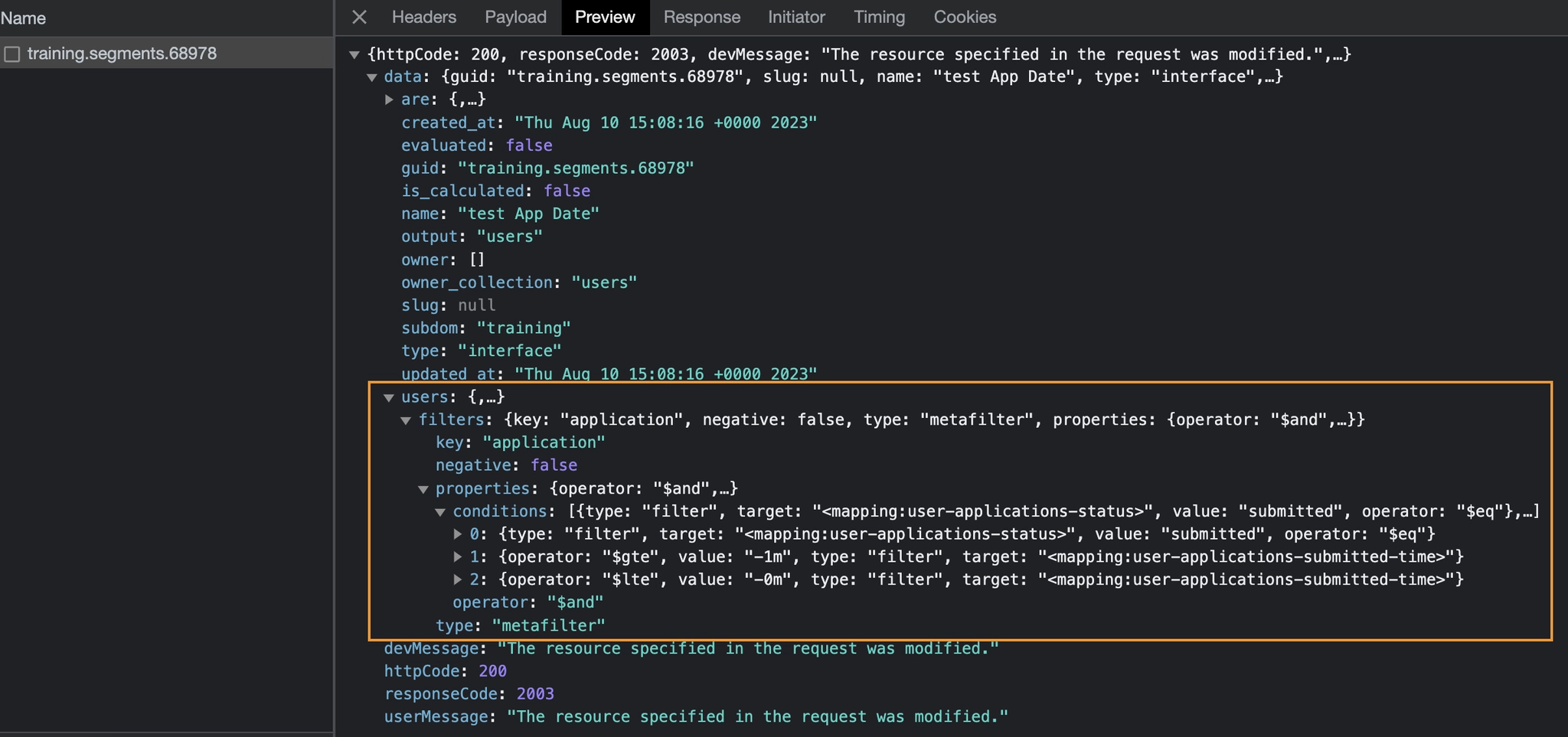
Building the Inline Segment Body
Your final export should look something similar to the example below which pulls all applicants with a submitted date in the last month, and has a root repeater showing all the majors for every applications for that applicant.
Request:
POST https://{{client}}.{{api}}/v2/users/export

URL parameters:
{{client}}: Assigned client subdomain.
{{api}}: URL of the Element451 API. "api.451.io" for Production API.

Request headers:
Feature: Feature token for that client
Content-Type: 'application/json'

Request body parameters:
{
    "item": {
        "template": {
            "columns": [
                {
                    "field": "First Name",
                    "mode": "slug",
                    "slug": "user-first-name",
                    "transformations": [],
                    "validations": [],
                    "empty": ""
                },
                {
                    "field": "Application Root",
                    "mode": "slug",
                    "slug": "user-applications-root",
                    "columns": [
                        {
                            "field": "Application - Major",
                            "mode": "slug",
                            "slug": "user-applications-major",
                            "transformations": [],
                            "validations": [],
                            "empty": ""
                        }
                    ]
                }
            ]
        },
        "segment": {
            "users": {
                "filters": {
                    "key": "application",
                    "negative":false,
                    "type": "metafilter",
                    "properties": {
                        "operator": "$and",
                        "conditions": [
                            {
                                "type": "filter",
                                "target": "<mapping:user-applications-status>",
                                "value": "submitted",
                                "operator": "$eq"
                            },
                            {
                                "operator": "$gte",
                                "value": "-1m",
                                "type": "filter",
                                "target": "<mapping:user-applications-submitted-time>"
                            },
                            {
                                "operator": "$lte",
                                "value": "-0m",
                                "type": "filter",
                                "target": "<mapping:user-applications-submitted-time>"
                            }
                        ]
                    }
                }
            }
        }
    }
}

Expected Response:
Status 200
{
    "data": [
        {
            "id": "611bf5aabd86ae7914",
            "First Name": "Molly",
            "Application Root": [
                {
                    "Application - Major": "client.major.3461"
                },
                {
                    "Application - Major": "client.major.109423"
                },
                {
                    "Application - Major": "client.major.5934"
                },
                {
                    "Application - Major": ""
                }
            ]
        },
        {
            "id": "6369ba9c467d0b22c8",
            "First Name": "Amber",
            "Application Root": [
                {
                    "Application - Major": ""
                },
                {
                    "Application - Major": "client.major.4470"
                },
                {
                    "Application - Major": "client.major.5934"
                }
            ]
        },
        {
            "id": "64d3a8520106152a1a03c",
            "First Name": "Sagar",
            "Application Root": [
                {
                    "Application - Major": "client.major.130260"
                }
            ]
        }
    ],
    "meta": {
        "count": 3
    }
}